Prime Ecosystem
Setup
Implementation
Optimisation
Training
Support
For Tradies
If you’re thinking about Prime Ecosystem for your trade business, you’ve come to the right people. We specialise in helping tradies assess, set up, and optimise Prime Ecosystem, whether you’re starting fresh or refining an existing system, backed by practical processes and tailored training.
Looking at Prime Ecosystem as an option for your team?
Looking at job management software? Prime Ecosystem ties your quoting, jobs, and invoicing together, but the real value comes from configuring it around how your trade business operates.
Already Using Prime Ecosystem and Frustrated?
Not Sure If Prime Ecosystem Is Right for You?
Who is Prime Ecosystem For?
The industries we find are best suited to Prime Ecosystem
iNDUSTRIES THAT MAY USE PRIME ECOSYSTEM INCLUDE:
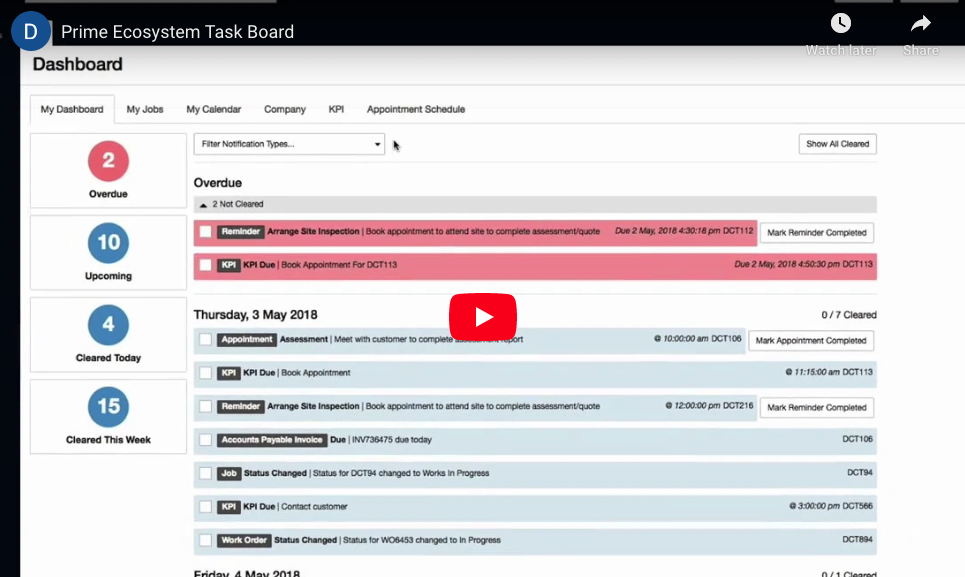
VIDEO OVERVIEW
SEE PRIME ECOSYSTEM IN ACTION
If you’re managing quotes, schedules, site documentation, stakeholders, and invoicing across multiple jobs, Prime Ecosystem works best when it’s set up properly around your workflow.
What Prime Ecosystem does well (and the problem it solves)
Real-time job tracking
See what’s happening on every job in real time, with clear visibility over progress, milestones, and delays.
Intuitive automation
Smart automation handles workflows, reminders, and notifications in the background, reducing manual work and.
Seamless integrations
Built for Site and Office
Custom dashboards
Template automation
WHS & compliance
Scheduling & Gantt charts
Stakeholder portals
finance management
Scalable job modules
Find out if Prime Ecosystem is right for your business
making Prime Ecosystem work for your business
sort out the Prime Ecosystem frustrations before they start
Most issues with Prime Ecosystem come down to setup, not the system itself.
The common frustrations we hear about Prime Ecosystem setups:
- The setup didn’t reflect how we actually run jobs, so everything feels clunky and out of order.
- We were shown the basics, but not how to use it properly for our workflows.
- There are too many steps for simple tasks, it feels more complicated than it should be.
- The team avoids using certain features because no one’s confident they’re doing it right.
- We know it can do more, but we’re not using half of it properly.
Want Prime Ecosystem set up properly from the start?
If it feels clunky or harder than it should, a targeted system review can tidy things up and get everything flowing smoothly again.
What seems small at first becomes inconsistent data, duplicated work, and admin headaches.
The platform isn’t the problem, it just needs to be configured around your real-world processes.
can you relate to this?
- We can’t tell where jobs are actually at without digging around.
- There are too many steps for simple tasks, it slows the team down.
- No one’s using it the same way, so the data’s all over the place.
- We’re still chasing updates, even though the system’s meant to show us everything.
- It feels powerful, but we’re only using a fraction of what it can actually do.
Questioning whether your Prime Ecosystem setup is right?
We’ll review how it’s configured and identify practical improvements to better suit your business. Book a call to find out more.
That’s when it makes sense to step back and assess whether the system just needs a more advanced, custom configuration to match your scale.
With stronger workflows, clearer reporting, and tighter structure, most businesses realise Prime Ecosystem can handle far more than they originally thought.
signs you might notice:
- We’ve grown, but the system still feels set up for when we were half this size.
- There’s too much manual checking between departments, it’s not flowing cleanly as we add more staff.
- Reporting isn’t giving us the depth we need now that we’re tracking multiple teams and bigger jobs.
- Approvals and variations are getting messy as job volume increases, it’s harder to keep control.
- The system worked fine when we were smaller, but now the cracks are showing as things get more complex.
Sick of fighting with Prime Ecosystem?
You shouldn’t have to fight Prime Ecosystem every day. A quick tune-up can fix the quirks, tidy your setup and make everything run smoothly again.
Getting the most out of Prime Ecosystem
how tradiepad can help
We regularly see businesses underusing Prime Ecosystem because of small setup mistakes. With the right structure and practical training, it becomes far easier to get real value from the system.
As a Prime Ecosystem certified expert, we have helped hundreds of Tradies implement Tradify into their business.
Prime Ecosystem setup & integration
We will assess your business needs and advise you on whether Prime Ecosystem will suit your unique trade business.
Prime Ecosystem Optimisation
We’ll review your setup, refine your workflows, and make sure Prime Ecosystem is configured to save you time and boost productivity.
Prime Ecosystem
training
Tailored training for you and your team so you can use Prime Ecosystem confidently and get the most out of every feature.
ongoing
support
Navigating the change to Prime Ecosystem is easy with ongoing TradiePad support available for your team.
Comparing your options
DIY vs Standard vs TradiePad
- DIY Setup
- Prime Ecosystem Standard Setup
- TradiePad Setup
|
DIY Setup
|
Prime Ecosystem Standard Setup
|
TradiePad Setup
|
|
Setup Time |
Trial and error configuration | Basic onboarding to get you "live" | Built around your workflows from day one |
Templates |
Generic templates, lots of manual rework | Basic templates and fields | Tradie-ready templates set up around your business |
Workflows |
Inconsistent processes, everyone does it differently | Standard workflows that don't fit with every fit every team | End-to-end workflows mapped to how you run jobs |
Training |
Self-taught with gaps everywhere | Generic training sessions | Role-based training for your entire team |
Integrations |
Integrations half connected and messy | Connect what you like approach | Only trusted tools integrated properly |
Support |
Forums, guesswork, slow fixes | Support only during their business hours | Fast, practical support from people who understand trade jobs |
Outcome |
Works but is clunky, slow, and hard to scale | Functional but not optimised | Smoother jobs, less admin, clearer reporting |
What our customers say
Prime Ecosystem client review
John Valentan
HBR GROUP
What our customers say
Prime Ecosystem client review continued
John Valentan
HBR GROUP
Wherever you’re at with Prime Ecosystem, TradiePad can help.
Whether you’re starting from scratch, scaling up, or fixing friction in your current Prime Ecosystem setup, we’ll refine the structure, workflows, and training so it runs smoothly.
Let's chat about your business
book a call
To avoid playing phone tag book a date and time that suits you to have a quick chat about how we can help your business.
I've Booked a call, now what?
01
The first step is a no obligation 15-minute intro call to see how we can help.
02
If you’re ready to move forward we’ll then conduct a 1-on-1 “Scoping Session” to determine the right solutions for you.
03
Once we’ve determined your specific needs we will send you a TradiePad proposal or recommendation tailored to your business.
Prime Ecosystem FAQs
answering your common Prime Ecosystem questions
Variations and approvals should follow a structured path with mandatory fields, automated notifications, and digital sign-off before they move forward. Once approved, they should flow cleanly into invoicing and reporting without manual rework. This prevents lost revenue, delays, and messy communication.
Your dashboards should clearly show budget versus actuals, variations, labour allocation, and job stage bottlenecks. They need to highlight where margin is being made or lost in real time, not weeks later. If the dashboard doesn’t help you make decisions quickly, it needs refining.
Training should be role-based and practical, showing each team member exactly how they use the system day to day. Clear internal standards and follow-up sessions are essential to reinforce consistency. Most usage issues come from unclear processes, not unwilling staff.
A basic setup gets you live quickly using default settings and generic workflows. A tailored configuration aligns the system with your job lifecycle, reporting needs, accounting structure, and team roles. The platform is the same, but the structure behind it determines whether it scales smoothly or creates friction.
Yes, admin, project managers, and site teams use different parts of the system and should be trained accordingly. Role-based training keeps it relevant and avoids overwhelming people with features they don’t need. This also improves consistency because everyone understands their specific responsibilities.
Onboarding should cover your agreed workflows, job stages, variations process, document handling, approvals, reporting, and integration points with accounting. It’s important to teach not just “how to click,” but how your business expects the system to be used. Clear standards prevent confusion later.
The fastest approach is structured onboarding with documented workflows and short, practical training sessions based on their role. Pairing them with a trained internal champion and using real job examples accelerates learning. Clear SOPs and dashboards help new staff understand expectations from day one.
Templates should be centrally managed and locked down so individuals aren’t editing their own versions. Assign one system owner to review and update templates as your services, pricing, or compliance requirements change. Regular audits prevent template drift and inconsistent quoting.
This usually comes down to incorrect field mapping, missing variables, or inconsistent job setup. If cost codes, stages, or integrations aren’t aligned properly, the template won’t populate accurately. Fixing the structure behind the template often solves the issue.
Templates should be tied to specific job stages or status changes within your workflow configuration. When set up correctly, moving a job to a new stage automatically triggers the right document, notification, or approval request. This reduces manual steps and keeps the process consistent across the team.
The integration needs correct account mapping, tax code alignment, and consistent cost codes from the start. Both systems should agree on how invoices, variations, and payments are structured before syncing. Most mismatches happen when workflows are built first and integrations are configured later.
This is usually caused by incorrect account mapping, missing tax codes, duplicate contacts, or incomplete invoice approvals before syncing. If invoice status rules aren’t clearly defined, the system won’t know what should push through. Cleaning up the structure behind the sync usually resolves the issue.
Double-entry happens when roles aren’t clearly defined between systems. Decide which platform is the “source of truth” for invoicing, contacts, and financial data, then configure integrations to flow one way where possible. Clear ownership of data eliminates duplication.
Yes, and you should. A staged rollout or sandbox test allows you to verify mapping, invoice flow, and reporting accuracy before pushing live data. Testing prevents reconciliation headaches and costly clean-ups later.
Job stages should reflect your real construction lifecycle, from assess and quote through to build, variations, completion, and defects. Each stage needs a clear owner and defined entry/exit criteria so everyone knows when a job is ready to move forward. If stages are too vague or too detailed, visibility suffers.
Jobs usually get stuck when responsibilities or trigger points aren’t clearly defined. Assign stage ownership and automate reminders or approval checkpoints to prompt movement. Regular dashboard reviews also help spot bottlenecks before they impact timelines.
Yes, status changes can be linked to specific actions such as approvals, document completion, or variation sign-off. When configured properly, the system can move jobs forward automatically once criteria are met. Automation reduces manual updates and keeps workflows consistent.
Clunky workflows are often the result of too many manual steps or generic configurations that don’t reflect how your business actually operates. If approvals, notifications, and integrations aren’t aligned, the system creates friction instead of removing it. Simplifying and tailoring the workflow usually resolves this.
Clear role definitions and automated stage transitions reduce unnecessary back-and-forth. When job data, photos, approvals, and notes are structured properly, both office and site teams work from the same information. The fewer manual check-ins required, the smoother the handover becomes.
Yes, Prime Ecosystem is accessible via mobile devices and tablets, allowing supervisors and field staff to view and update jobs in real time. Because it’s cloud-based, teams can log in from site without needing to return to the office. Ease of use largely depends on how cleanly the workflows are configured.
Prime Ecosystem relies on an internet connection to sync data in real time. In areas with limited coverage, users may experience delays until connectivity is restored. For remote projects, it’s important to plan around connectivity and confirm how your setup handles sync interruptions.
Field staff can update job stages, add notes, complete checklists, and log activities directly within the job record. When workflows are structured properly, these updates automatically notify the office and keep reporting current. Clear role-based permissions ensure they only see what’s relevant to them.
Yes, supervisors can attach photos, documents, and notes to specific jobs while on-site. This keeps all project communication centralised rather than scattered across texts and emails. Structured uploads also improve record-keeping and compliance tracking.
Keep the interface simple by removing unnecessary steps and tailoring workflows to what field teams actually need. Role-based training and clear standards prevent confusion and reduce resistance. Most usability issues stem from overcomplicated setups rather than the system itself.
This usually happens when stage transition rules or permissions aren’t configured correctly. If required fields, approvals, or triggers aren’t completed, the system won’t move the job forward. Reviewing your workflow logic and stage criteria typically resolves the issue.
Access issues are often linked to role-based permissions or visibility settings. If user roles aren’t aligned with job ownership or document access rules, team members won’t see what they need. Adjusting permissions and reviewing user roles usually fixes the problem.
Notifications depend on specific trigger conditions such as stage changes, approvals, or task completion. If the trigger rules aren’t configured properly, or required fields aren’t completed, they won’t activate. Reviewing automation logic and testing each trigger usually identifies the gap.
Template issues often stem from incorrect field mapping or inconsistent job setup. If variables aren’t aligned with your workflow structure, data won’t populate correctly. Fixing the underlying data structure usually corrects the template output.